Asset Tracker for Networks 9.3
Updated on 16 Feb 2012
By Anthony Buckner
By Anthony Buckner
Specifications
License:
Shareware
Updated:
Downloads:
3265
Platform:
Windows All
Publisher:
Alchemy lab(more)
Website:
User Reviews:
Other versions:
8.9, 8.8, 8.7
Do you like
Asset Tracker for Networks?
FindMySoft Editor's Review
Asset Tracker for Networks - Network inventory tool
Keeping an eye on an entire network can be a demanding task. You may have lots of computers in your care and knowing each one's inventory isn't easy. Asset Tracker for Networks can save you a lot of time by providing you with a detailed look on your network's inventory, which you can get to with a few clicks. When it comes to seeing what hardware, software or other things have been installed on a computer from your network, this program can offer a complete report.
Installing it on your computer won't require making any network related settings or configurations. The size of the installation package is just under 6 Mb, so once you download it, you'll be a few seconds away from having it running on your machine.
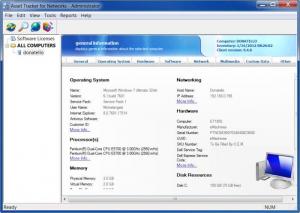
The interface isn't something you can get lost in. It's a window which contains a broad range of details about your own computer or the ones from the local network. From general info, like operating system, hardware or disk resources to a more detailed look on your installed software, hardware and many more, you can easily access them by clicking on their tabs in the main window.
Viewing another computer's inventory is done like navigating a simple folder structure using the navigation pane from the left side of the window. Before you can access other computers, however, you need to add them in the same navigation pane. A good thing about Asset Tracker is that you can easily add other machines from your network. Even someone with no networking experience can do it. The Inventory Network button from the toolbar will bring up a wizard which will guide you all the way. There's no need to type any IPs or anything because the wizard will automatically detect other computers and all that's left for you to do is checking which one you want to add.
While it's simple enough to add computers from the network, there is some good news and some bad news you might want to consider.The bad news is that you'll have to fiddle around with permissions on the target PCs, but nothing too complicated. The better news is that Asset Tracker doesn't require you to install any clients on the target computers. It will detect their software, hardware and more, just like that.
Pros:
Asset Tracker for Networks provides the user with a great range of information about his or other computers from the local network. The data can be backed up or exported using various formats, including text or HTML.
Cons:
If you don't run it in full screen mode, you may miss some of the window's content.
If you need to keep track of your network's inventory, Asset Tracker for Networks can provide you with detailed reports regarding any aspect of a computer, be it yours or another one from your local network.
Installing it on your computer won't require making any network related settings or configurations. The size of the installation package is just under 6 Mb, so once you download it, you'll be a few seconds away from having it running on your machine.
The interface isn't something you can get lost in. It's a window which contains a broad range of details about your own computer or the ones from the local network. From general info, like operating system, hardware or disk resources to a more detailed look on your installed software, hardware and many more, you can easily access them by clicking on their tabs in the main window.
Viewing another computer's inventory is done like navigating a simple folder structure using the navigation pane from the left side of the window. Before you can access other computers, however, you need to add them in the same navigation pane. A good thing about Asset Tracker is that you can easily add other machines from your network. Even someone with no networking experience can do it. The Inventory Network button from the toolbar will bring up a wizard which will guide you all the way. There's no need to type any IPs or anything because the wizard will automatically detect other computers and all that's left for you to do is checking which one you want to add.
While it's simple enough to add computers from the network, there is some good news and some bad news you might want to consider.The bad news is that you'll have to fiddle around with permissions on the target PCs, but nothing too complicated. The better news is that Asset Tracker doesn't require you to install any clients on the target computers. It will detect their software, hardware and more, just like that.
Pros:
Asset Tracker for Networks provides the user with a great range of information about his or other computers from the local network. The data can be backed up or exported using various formats, including text or HTML.
Cons:
If you don't run it in full screen mode, you may miss some of the window's content.
If you need to keep track of your network's inventory, Asset Tracker for Networks can provide you with detailed reports regarding any aspect of a computer, be it yours or another one from your local network.
System Requirements
A standard PC
Do you like Asset Tracker for Networks
Quick Look VideoNew
Popular News
The soon to be released Samsung Galaxy S3 is shaping up to be an event bigger commercial success than its predecessor, the Samsung Galaxy S2
Linux fans once again have the chance to take part in the annual Linux Foundation T-Shirt Design Contest, now in its 3rd edition
Asset Tracker for Networks Awards
Asset Tracker for Networks Editor's Review Rating
Asset Tracker for Networks has been reviewed by Frederick Barton on
16 Feb 2012. Based on the user interface, features and complexity, Findmysoft has rated
Asset Tracker for Networks
4
out of 5 stars, naming it ExcellentYour Rating
Top Downloads
2.
Opera5.
Trillian8.
AIM9.
Skype10.
Ad-Aware12.
Nero13.
Google Earth14.
Picasa15.
Winamp16.
iTunes17.
RealPlayer18.
uTorrent19.
eMule20.
WinRAR21.
BitComet22.
WinZip23.
Shareaza24.
CCleaner25.
Recuva26.
Tweak UI27.
CuteFTP Home29.
Adobe Reader30.
NewsPiperBecome A Fan!
Link To Us!
Asset Tracker for Networks
HTML Linking Code
HTML Linking Code
Latest Reviews